StudyClassroom
Open the classroom进入课堂

About关于我们

Study Classroom学习课堂

Homework, reviews, attendance, quizzes and lectures for a university class, in one place. Students hand in their work and see every review. Teachers review it, take attendance and run live quizzes. In English and Chinese, on a computer or a phone.大学课堂的作业、批阅、考勤、测验和课件,汇集一处。学生提交作业、查看每一次批阅;老师批阅作业、记录考勤、开展实时测验。支持中英文,电脑和手机都能用。

  • Homework and reviews作业与批阅
  • Attendance with QR check-in扫码签到考勤
  • Live quizzes and leagues实时测验与联赛
  • Lectures by chapter按章节的课件

Our story我们的故事

It started with homework一切从作业开始

  1. The start起步

    Homework ClassroomHomework Classroom

    Josh is a teaching assistant for a Java course, and checking homework is part of the job. He built Homework Classroom for one thing: to collect his students’ homework and review it in one place.Josh 是一门 Java 课程的助教,批改作业是他的工作之一。他搭建了 Homework Classroom,只为一件事:在一个地方收集并批阅学生的作业。

  2. Feedback反馈

    Shaped by students由学生塑造

    The first feedback was positive. Talking with students and reading what they sent, Josh kept finding things the site could do better, and much more it could do.最初的反馈很积极。在与学生的交流中、在他们发来的反馈里,Josh 不断发现网站可以做得更好,也可以做得更多。

  3. Today如今

    Study Classroom学习课堂

    So Homework Classroom grew into Study Classroom: one organised place where professors and assistants take attendance, review homework, run quizzes and share lectures, and where students find everything for their class.于是,Homework Classroom 发展成了学习课堂:一个井然有序的地方,教授和助教在这里记录考勤、批阅作业、开展测验、分享课件;学生则能在这里找到课程所需的一切。

  4. Next未来

    Still growing仍在成长

    Much of what comes next starts as an idea from the people who use it. Every piece of feedback is read.接下来的许多功能,都来自使用者的想法。每一条反馈都会被认真阅读。

Founder & owner创始人兼所有者

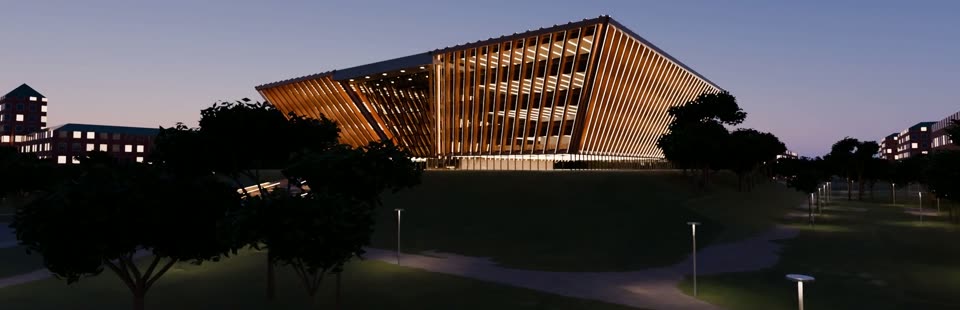
E3 Library, rendered by Josh in BlenderE3 图书馆,由 Josh 用 Blender 渲染

Spasoje Pavlovic (Josh)Spasoje Pavlovic(Josh)

Josh designs, builds and runs Study Classroom. He studies Computer Science and Technology at South China University of Technology and is a member of the Public Relations Department of its International Student Union (ISU).Josh 负责学习课堂的设计、开发和运营。他是华南理工大学计算机科学与技术专业的学生,也是该校国际学生联合会(ISU)公关部的成员。

  • 40K+YouTube subscribersYouTube 订阅者

    Before Study Classroom, Josh ran popular social media pages.在学习课堂之前,Josh 运营过多个受欢迎的社交媒体账号。

  • 2023Erasmus+ videosErasmus+ 视频

    In high school he made learning videos on robotics and PLC machines for an Erasmus+ online learning platform, using Adobe’s creative tools.高中时,他使用 Adobe 创意工具,为一个 Erasmus+ 在线学习平台制作了机器人技术和 PLC 设备的教学视频。

    Most proficient in最擅长

    • After Effects
    • Premiere Pro
    • Photoshop
  • Now现在Agentic tools and Study Classroom智能体工具与学习课堂

    He is currently working on agentic tools for automation, and on Study Classroom, this site.他目前正在开发用于自动化的智能体工具,以及学习课堂,也就是这个网站。

Affiliations are listed for biographical purposes only. SCUT, the ISU and Erasmus+ do not own, run, sponsor or endorse Study Classroom.以上所属关系仅作个人简介之用。华南理工大学、国际学生联合会和 Erasmus+ 并不拥有、运营、赞助或认可学习课堂。


Projects项目

Built by JoshJosh 的作品

Desktop app · AI agents桌面应用 · AI 智能体

SpaleStudio

We built this website with SpaleStudio. SpaleStudio is the AI command center: every coding agent in one window. If it runs in a terminal, it runs here, from Claude Code and Codex to Gemini, Kimi and OpenCode. Chat with any agent, let them work as a team and talk to each other, answer what they ask, and watch every edit they make.我们用 SpaleStudio 打造了这个网站。SpaleStudio 是 AI 指挥中心:所有编程智能体都在一个窗口里。只要能在终端里运行,就能在这里运行,从 Claude Code、Codex 到 Gemini、Kimi 和 OpenCode。你可以和任何智能体对话,让它们组队协作、互相交流,回答它们的提问,并查看它们的每一处修改。

  • Agents智能体Claude Code, Codex, Gemini and more, side by side.Claude Code、Codex、Gemini 等并排运行。
  • Swarms群组协作Agents work as a team and talk to each other.智能体组队协作,互相交流。
  • Chat对话Chat with any agent and answer what it asks.和任何智能体对话,回答它的提问。
  • Routines例行任务Work that starts itself, on a schedule.按计划自动开始的任务。
  • For Windows适用于 WindowsAvailable for Windows.可在 Windows 上使用。

Speech to text语音转文字

SpaleVoice

Speak, and SpaleVoice writes it down. It turns your voice into text with a model in the cloud, through an API, or with a model that runs on your own computer.说话,SpaleVoice 帮你写下来。它可以通过 API 使用云端模型,也可以使用在你自己电脑上运行的本地模型,把语音转成文字。

  • Cloud models through an API通过 API 使用云端模型
  • Local models本地模型

Blender logo3D film · Blender · AI三维影片 · Blender · AI

E3 Library, SCUT Guangzhou International Campus华南理工大学广州国际校区 E3 图书馆

The campus library rebuilt in 3D at real scale from Josh’s photos and satellite data, then filmed as an 82-second tour at blue hour. The model was built in Blender with Claude Opus 5.5; the interior and the footbridge are imagined with AI.根据 Josh 拍摄的照片和卫星数据,以真实比例三维重建校园图书馆,并制作成一段 82 秒的蓝调时刻漫游影片。模型由 Claude Opus 5.5 在 Blender 中搭建;室内和人行天桥的设计由 AI 构想。

footprint占地面积
109 × 96 m
roof height屋顶高度
≈ 32 m
façades lean outward立面外倾角
29°
box girders over the atrium中庭上方的箱梁
27
How it was made制作过程
  1. Placed from above从空中定位

    The photos carry no GPS, so the position, footprint and orientation come from satellite imagery and OpenStreetMap: 109 × 96 m, with the main axis at 337.4°.照片不含 GPS 信息,因此位置、占地和朝向都来自卫星影像和 OpenStreetMap:占地 109 × 96 米,主轴方位 337.4°。

  2. Measured from photos从照片测量

    Heights come from the perspective of Josh’s photos, taken with a OnePlus Ace 5 Ultra at a 24 mm equivalent: a roof of about 32 m, glass façades leaning 29° as officially published, 27 box girders spanning 32.2 m over the atrium, a 7.5 m green podium with the grand stair and 184 timber-finish louvre fins with LED lines, for about 52,000 m² of floor area.高度根据 Josh 用一加 Ace 5 Ultra(等效 24 毫米焦距)拍摄的照片透视推算:屋顶约 32 米,玻璃立面按官方数据外倾 29°,27 根箱梁以 32.2 米的跨度横跨中庭,7.5 米高的绿化基座连着大台阶,184 片木纹百叶带有 LED 灯带,总建筑面积约 52,000 平方米。

  3. Imagined inside构想室内

    The atrium follows the official “book mountain, wisdom valley” concept. The interior and the footbridge are imagined with AI, not surveyed.中庭参照官方公布的设计理念(“book mountain, wisdom valley”)呈现。室内和人行天桥由 AI 构想,并非实测。

  4. The surroundings周边环境

    Neighbouring buildings come from OpenStreetMap or are traced from the satellite image, and trees stand where the imagery shows canopy.周边建筑来自 OpenStreetMap,或依据卫星影像描绘;树木种在影像中有树冠的位置。

  5. Blue hour蓝调时刻

    The light is 6 September at 19:01, with the sun 6.1° below the horizon.光线设定为 9 月 6 日 19:01,太阳位于地平线下 6.1°。

  6. Rendering渲染

    Blender 5.2 with Cycles and OptiX, 1920 × 1080 at 24 frames per second, with original music.使用 Blender 5.2 的 Cycles 渲染器和 OptiX,1920 × 1080、每秒 24 帧,配原创音乐。

The computer使用的电脑

Processor处理器
AMD Ryzen 7 5700X8 cores, 16 threads8 核 16 线程
Graphics显卡
NVIDIA GeForce RTX 3060Cycles with OptiXCycles + OptiX
Memory内存
32 GB
System系统
Windows 11 Pro

Map data © OpenStreetMap contributors (ODbL). Satellite imagery: Esri World Imagery (Esri, Maxar, Earthstar Geographics). Building facts: SCUT news, 11 December 2023. An independent project, not made or endorsed by SCUT.地图数据 © OpenStreetMap 贡献者(ODbL)。卫星影像:Esri World Imagery(Esri、Maxar、Earthstar Geographics)。建筑数据:华南理工大学新闻,2023 年 12 月 11 日。本项目为个人独立作品,并非由华南理工大学制作或认可。

Web app · 2026网页应用 · 2026

Study Classroom学习课堂

This website. Designed, built and run by Josh, from the pages students and teachers use to the server behind them. The trailer shows two of its newest parts: Java code that compiles and runs in the browser, and interactive lectures.就是这个网站。从师生使用的每个页面到背后的服务器,都由 Josh 设计、开发和运营。预告片展示了两项最新功能:在浏览器中编译并运行 Java 代码,以及互动课件。

What’s inside里面有什么

  • Homework and reviews作业与批阅Hand in files, get a review with notes, fix and send again.提交文件,收到带批注的批阅,修改后再次提交。
  • Java in the browser浏览器里的 JavaJava code compiles and runs right on the page.Java 代码直接在页面上编译并运行。
  • Interactive lectures互动课件Slides by chapter, with code to run and quick checks.按章节的课件,可以运行代码,还有小测验。
  • Attendance考勤A weekly record, and a QR code to check in.每周的考勤记录,扫码即可签到。
  • Live quizzes实时测验Played live in class, with leagues and prizes.在课堂上实时进行,还有联赛和奖品。
  • Badges and pets徽章与宠物Badges for good habits, and a pet to look after.好习惯换来徽章,还有一只要照顾的宠物。
  • English and Chinese中英文
  • Light and dark浅色与深色
  • Computer and phone电脑与手机
Open the classroom进入课堂